


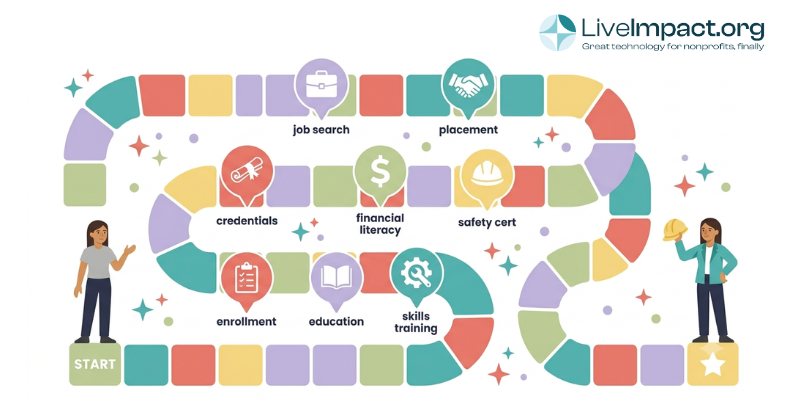
Dedicated program and case management software changes this. The right platform keeps every client milestone, service note, and outcome in one place so staff spend less time assembling data and more time working with participants. This guide reviews seven options well-suited to workforce development programs and walks through what to look for before signing a contract.
What workforce development nonprofits need in case management software
Workforce development programs have different software requirements than most human services programs. A platform designed for child welfare or housing will have the wrong default forms, the wrong milestone structures, and reports that don’t match what a workforce funder needs.
Before reviewing specific platforms, here’s what makes workforce development case management distinct.
Milestone and stage tracking
Participants move through defined stages: intake and assessment, skills training, job preparation, placement, and post-placement retention follow-up. Good software lets you define these stages and track each participant’s position in the pipeline. Staff should be able to see at a glance who has completed job readiness training, who has an active placement, and who needs a 30-day check-in.
Generic case management systems often have no concept of a participant pipeline. You end up building it yourself with custom fields, which works but requires ongoing maintenance.
Employment outcome tracking
Funders want placement rates, wage levels, job retention at 30/90/180 days, and often sector-specific data like full-time versus part-time placement and industry sector. These are standard fields in very few human services platforms. A workforce-specific platform or a highly configurable system can capture them without heavy customization work.
Reporting for multiple funders
Workforce development programs often receive funding from multiple sources simultaneously: Workforce Innovation and Opportunity Act (WIOA) funds, state workforce agencies, foundations, and local government contracts. Each funder has different reporting templates and data fields. Generating customized reports without rebuilding your data structure for each funder saves significant time as programs grow.
HIPAA compliance when applicable
Many workforce participants receive wraparound services including mental health support, substance use recovery, and housing assistance. If your organization collects health-related information during intake or case management, HIPAA-compliant storage and access controls are required. Confirm this with any vendor before signing.
At a glance: platform comparison
| Platform | Customization | Multi-funder reporting | Pricing model | Best for |
|---|---|---|---|---|
| LiveImpact | ⬤ Highly configurable | ⬤ Yes, by program/funder | Flat-rate | Multi-program nonprofits with custom tracking needs |
| Exponent Case Management | ⬤ Yes (Salesforce-based) | ⬤ Yes | Per-user (Salesforce) | Orgs already on Salesforce |
| Casebook | ⬤ Partial | ⬤ Yes | Per-user | Small-to-mid programs with basic needs |
| CaseWorthy | ⬤ Highly configurable | ⬤ Yes (WIOA, TANF, CSBG) | Per-user (enterprise) | Large orgs with dedicated IT; complex compliance |
| myOneFlow | ⬤ Yes (low-code) | ⬤ Yes | Per-user (tiered) | Single-program workforce-only programs |
| Social Solutions ETO | ⬤ Limited (consultant-led) | ⬤ Yes, deep outcome tools | Per-user (enterprise) | Large programs with sophisticated funder requirements |
| Apricot (Bonterra) | ⬤ Partial (form-builder) | ⬤ Yes | Per-user | Mid-tier orgs ($1M-$5M budget) familiar with Bonterra |
⬤ Yes / Included
⬤ Partial / Limited
⬤ Not available
7 case management platforms to consider
1. LiveImpact
LiveImpact is an all-in-one nonprofit platform with a nonprofit case management module built around configurable program structures. Staff can define their own intake forms, service milestones, and outcome fields without needing a developer or technical consultant. For workforce development programs, that flexibility matters because your tracking requirements look different from a housing program or a youth services org, and your software should reflect that.
The platform lets you build intake forms, milestone stages, and outcome fields around your specific funder requirements rather than forcing your program into someone else’s default structure. If one funder needs 90-day employment retention data and another needs wage levels by industry sector, you can configure the system to capture both without workarounds or parallel spreadsheets.
Pricing is flat-rate rather than per-user, which matters for programs with variable staffing like AmeriCorps cohorts or seasonal job coaches. Costs stay consistent regardless of how many staff accounts are active, which makes annual budgeting more predictable. For organizations that also manage donors, grants, or volunteers, LiveImpact handles those functions in the same system, which can reduce the number of platforms your team juggles.
Best fit: Multi-program nonprofits that need a case management platform they can shape around their own workflows and funder requirements. Most valuable where standard out-of-the-box structures would require significant workarounds to match your program model.
2. Exponent Case Management (Salesforce)
Exponent Case Management is built on Salesforce and includes a purpose-built Workforce Development Module covering skills assessments, job training tracking, employer engagement, and placement documentation. Milestone tracking and outcome reporting align well to workforce program types.
A strong choice for organizations already invested in the Salesforce ecosystem. The trade-off: Salesforce-based platforms carry higher price points and typically require a Salesforce administrator, adding to the true cost of ownership.
Best fit: Organizations already on Salesforce infrastructure.
3. Casebook
Casebook markets a specific employment case management product targeting workforce agencies and nonprofits. It includes standard job-placement tracking, assessments, and compliance reporting features with a modern interface and generally smooth onboarding.
For small workforce programs, the pricing is accessible. For larger organizations or those with complex multi-funder reporting needs, customization depth can be limiting compared to more configurable platforms.
Best fit: Small-to-mid programs that want accessible pricing and a modern interface.
4. CaseWorthy
CaseWorthy is a configurable case management platform used across human services verticals including workforce development, housing, and family services. It’s often selected by larger organizations with complex program structures and compliance requirements covering WIOA, TANF, and CSBG.
The platform handles employer tracking and multi-funder reporting but requires a meaningful implementation investment. Organizations with dedicated IT or program operations staff will use it well. Smaller teams with limited technical capacity may find the configuration process time-consuming.
Best fit: Large organizations with complex compliance requirements and dedicated technical staff.
5. myOneFlow
myOneFlow is a workforce-specific platform built around low-code customization. It emphasizes participant tracking through defined program stages and has strong features for employment milestone documentation. Popular with workforce development boards and programs that need clean visual pipeline tracking.
The trade-off: myOneFlow focuses primarily on workforce development and lacks the broader organizational functions that multi-program nonprofits need.
Best fit: Workforce-only programs or workforce development boards.
6. Social Solutions ETO (Bonterra)
ETO (Efforts to Outcomes) by Bonterra is one of the most established platforms in the sector. It has deep outcome measurement capabilities and is used by many large workforce development programs with sophisticated funder reporting requirements. If you’re currently on ETO and weighing alternatives, there are several ETO alternatives worth comparing before renewing.
Pricing is per-user and the platform is built for enterprise-scale operations. For smaller or mid-size workforce development nonprofits, the cost and complexity often outweigh the feature depth.
Best fit: Large enterprise programs with dedicated data staff and complex funder requirements.
7. Apricot (Bonterra)
Apricot is Bonterra’s more accessible case management product, positioned between entry-level tools and enterprise systems. It has configurable forms, outcome tracking, and reporting features suitable for workforce programs. Like ETO, it uses per-user pricing, which can push monthly costs higher than expected for programs with multiple case managers.
Worth evaluating for organizations in the mid-tier range that want more structure than a basic form builder but prefer to avoid a CaseWorthy-scale implementation.
Best fit: Mid-tier organizations already familiar with the Bonterra ecosystem.
How to evaluate your options
Before demoing anything, pull the last two reporting templates you submitted to funders and identify every data field. Confirming whether those exact fields can be captured and exported in a given platform eliminates half the options quickly.
When you get to demos, here are four specific tests worth running:
- Test milestone tracking with a real participant journey. Ask the vendor to enroll a fictional participant, document a skills assessment, mark a job placement, and generate a 90-day retention follow-up record. How many clicks does that take? Can a non-technical staff member do it without navigating multiple modules?
- Ask specifically about employer contact management. Many platforms bury employer tracking in custom objects or leave it out entirely. If your program actively manages employer relationships, confirm where those contacts live and how they connect to participant placement records.
- Request a sample report matching one of your funder templates. Vendors will show you their best default report. Ask for the specific output your county workforce board or foundation requires. The answer reveals genuine capability versus a workaround.
- Map out the true cost at different staff sizes. Per-user pricing can look cheaper than flat-rate at small team sizes but reverses as you scale. Understand what you’d pay at your current team size, at 2x growth, and at 3x growth. A more detailed look at case management software pricing for nonprofits covers the main models and their long-term cost implications.
Pricing overview
Workforce development case management software spans a wide price range. The market generally segments into three tiers:
- Entry-level platforms (Casebook, myOneFlow at smaller scale) run roughly $200-$600/month depending on team size and feature tier.
- Mid-market platforms (LiveImpact flat-rate, Apricot) run roughly $350-$1,200/month depending on features and modules.
- Enterprise platforms (CaseWorthy, ETO, Exponent on Salesforce) run $1,500-$5,000+/month depending on user count, modules, and implementation support.
For most nonprofits with annual revenues between $500K and $5M, the mid-market range offers the best combination of feature depth and affordability. Enterprise platforms introduce implementation timelines of 3-6 months and require ongoing technical support that smaller teams often cannot sustain.
Flat-rate pricing is particularly valuable for workforce programs with variable staffing. If you bring on three seasonal job coaches for a summer program, per-user pricing means your software cost jumps for four months and then drops again. Flat-rate keeps costs consistent. According to a TechImpact survey on nonprofit technology spending, unpredictable software costs rank among the top three technology-related budget challenges for small nonprofits.
For a deeper breakdown of what these pricing models mean over a three-year horizon, see the case management software pricing guide.
Frequently asked questions
What features should workforce development nonprofits prioritize in case management software?
The four most important features are participant milestone tracking, employment outcome documentation (placement dates, employer names, wages, retention status), multi-funder report generation, and configurable intake forms. These four determine whether you can actually do your job in the system. Everything else is secondary.
Can case management software help with WIOA compliance reporting?
Yes, though the depth of WIOA-specific support varies significantly between platforms. Some platforms (CaseWorthy, myOneFlow, ETO) have pre-built WIOA reporting modules. Others (LiveImpact, Casebook) are configurable enough to capture WIOA-required data with custom form setup but do not come pre-built for it. The U.S. Department of Labor’s WIOA program page outlines the specific reporting requirements your platform will need to support. Ask any vendor directly about WIOA reporting and request a sample output before committing.
How long does it typically take to implement case management software for a workforce program?
Most mid-market platforms run 4-12 weeks from contract to go-live for a workforce development implementation. The timeline depends on how much data migration is needed, how many custom forms require configuration, and how many staff members need training. Enterprise platforms (CaseWorthy, ETO) typically run 3-6 months.
Should we migrate existing client data to the new system?
For active participants, yes. Historical data from completed program cohorts is a case-by-case decision. Migrating years of historical records takes time and adds cost. Many organizations set a cutoff date, bringing in active clients and the past 12-18 months of closed cases, then archiving older records externally.
What is the difference between per-user and flat-rate pricing for workforce programs?
Per-user pricing charges based on how many staff accounts are active. Flat-rate pricing covers unlimited users for a fixed monthly fee. For programs with variable staffing (seasonal job coaches, part-time case managers, AmeriCorps members), flat-rate pricing eliminates the guesswork of figuring out whether to give everyone a full license. It also makes annual budgeting more predictable. The case management software pricing breakdown covers long-term cost differences in more depth.
Can smaller workforce development nonprofits afford case management software?
Programs with 50-100 annual participants and tight budgets can benefit from case management software if the alternative is significant staff time lost to spreadsheet management and manual reporting. According to U.S. Bureau of Labor Statistics data, social services employment continues to grow, increasing the administrative pressure on smaller organizations to manage caseloads efficiently. Most mid-market platforms offer pricing in the $300-$600/month range, and for an organization spending 10-15 staff hours per month on data assembly, that represents a favorable return on investment before accounting for improved funder reporting quality.
Is case management software the same as a workforce development tracking system?
They overlap significantly but serve different purposes. State-mandated workforce tracking systems (some WIOA compliance databases) focus on reporting to government agencies. Case management software focuses on the ongoing relationship with participants: notes, plans, referrals, milestones. Many nonprofits use both, with the state-mandated system handling compliance data entry and a separate case management platform managing internal program operations.
Making the final call
There’s no universal right answer. The best platform for a workforce development program matches your program structure, your staff’s technical comfort, and your funder reporting requirements. What’s consistent across organizations is that dedicated case management software stops the hours lost to spreadsheet consolidation and makes it easier to see which participants need attention and where program outcomes actually stand.
LiveImpact was built for nonprofits that need case management alongside the rest of their operations. If your workforce development program also tracks donors, manages grants, or coordinates volunteers, it’s worth seeing whether running everything from one platform changes how your team works.
Request a demo to see LiveImpact’s program and case management module in action.